Workflows
Route changes through the right gates.
Infrastructure changes move through approvals, execution steps, and evidence in one reviewed workflow, never as an out-of-band change.
DAG-based execution
Approval gates
Retries and timeouts
Manual, cron, or webhook
ops0 brings your clouds, runtime, infrastructure code, and workflows into one operating context. Workflows route risky infrastructure fixes through approval gates, execution steps, retries, and evidence, so nothing reaches production outside a reviewed, approved path.
ops0.ai/features/workflows
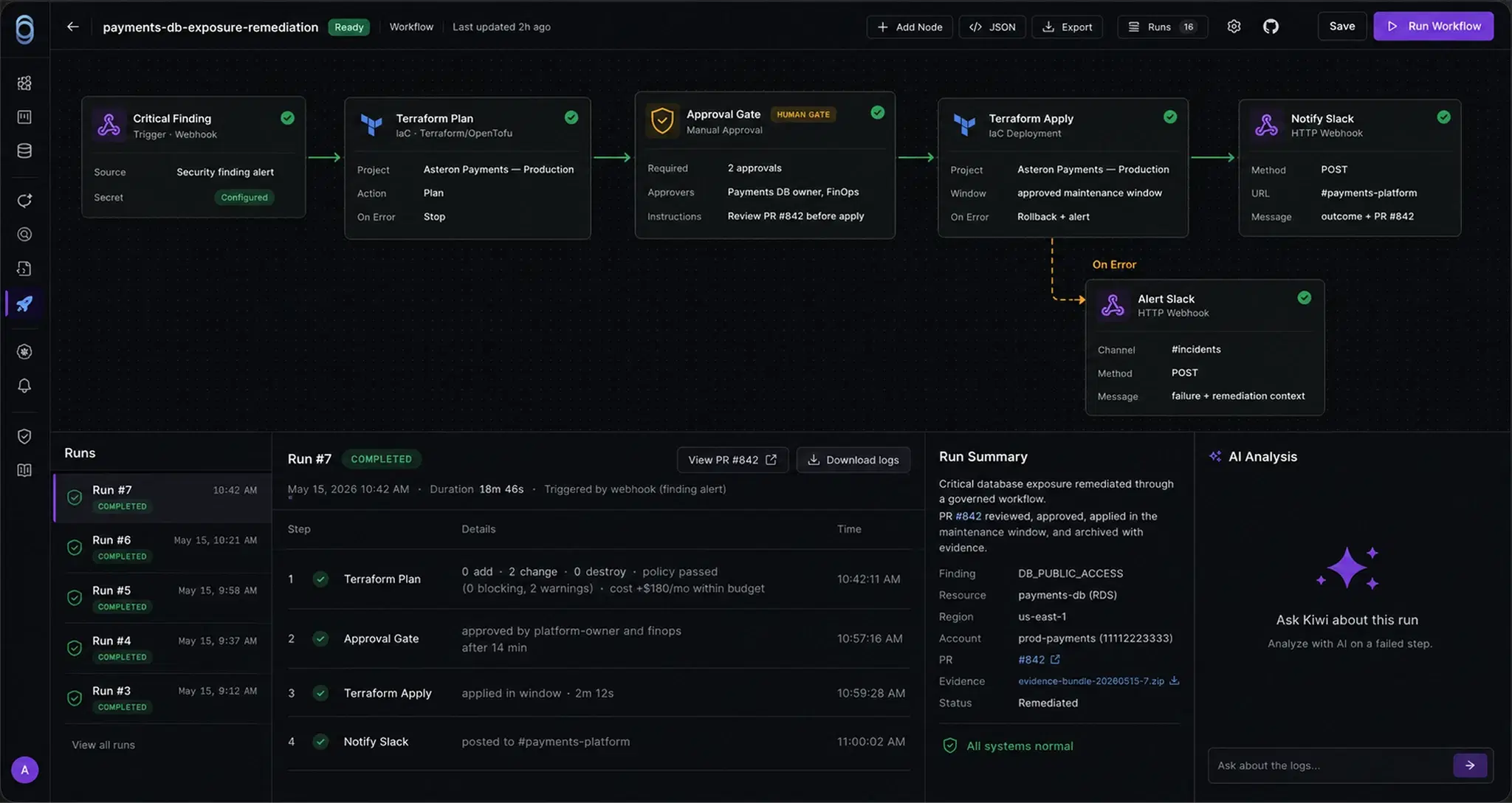
Runbooks live in one person's head. Workflows put every step where the team can see it.
7 step typesManual, scheduled, webhookApproval gatesFull run log
A workflow, running
01 / 04 · Trigger
Triggered by a webhook.
Discovery flags an exposed database, and the remediation workflow starts.
Trigger
Webhook received
webhook · discovery.finding.confirmed · rds-payments-ledger-prod
Going deeper
Automation you can stop and inspect.
DAG engine
Check, approve, run. In one flow.
DAG-based execution with dependencies between steps.
Seven step types: IaC, config, and Kubernetes deploys, scripts, webhooks, approvals, and incident checks.
Workflow: sg-ingress-remediationActive DAG
01FindDiscovery flags exposed security group
Done
02FixReviewed remediation drafted from context
Done
03ApprovalPlatform owner and security lead required
Pending
04DeployIaC apply queued behind signoff
Waiting
05EvidencePlan, approver, and outcome recorded
Waiting
Trigger
Manual
Steps
5
Gate
Approval
Under the hood
The steps a real change needs.
Step types
Seven step types.
IaC deploy
Config deploy
Kubernetes deploy
Script
HTTP webhook
Approval gate
Kubernetes incidents
Chain any mix of them, in any order a real change needs.
Triggers
Three ways to start a run.
Manual
Scheduled
Webhook
Reliability
Retries and timeouts.
http_webhookretry 2 of 3
timeout 10m · backoff 30s
Live execution
Watch it, stop it.
iac_deploy: apply started
http_webhook: retry 2/3
notify_slack: delivered
Cancel run
Kubernetes step
Incident-aware.
age> 10m
count>= 3
Webhook security
Rotate the webhook secret.
Signing secret
whsec_••••••••7f2a
Regenerated 2 days ago
Common questions
ops0 workflows can automate infrastructure checks, operational tasks, approvals, deployment steps, remediation paths, and repeatable cloud operations.
Build it, check it,
approve it, run it.
Workflows chain the steps a real change needs, hold for approval, and keep the evidence behind every run.