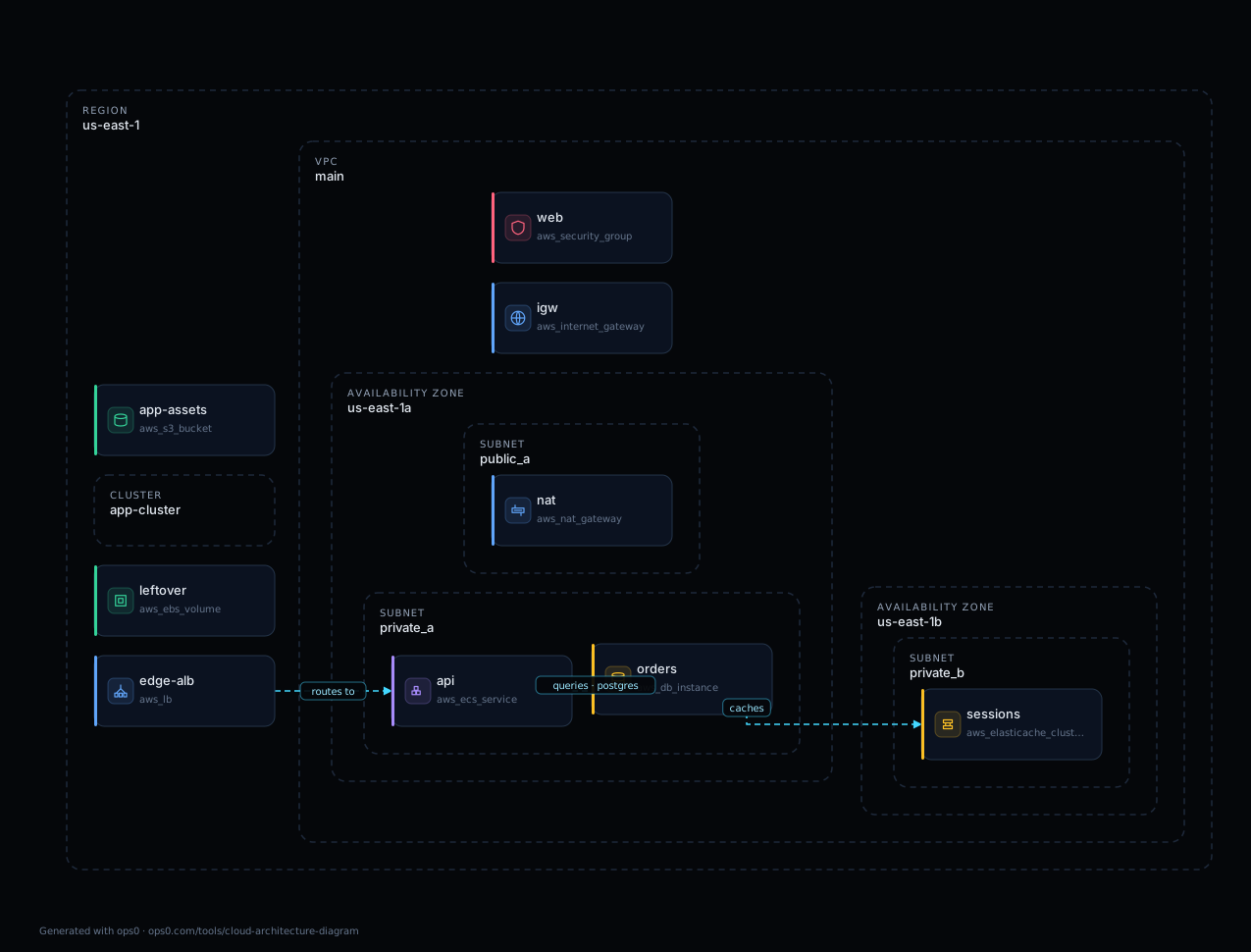
An infrastructure diagram becomes stale when the environment changes and the drawing does not. A deployment, scaling event, or manual configuration update can leave important resources and dependencies missing. ops0 Resource Graph helps teams inspect infrastructure context from state and discovery instead of relying only on a manually maintained drawing.
A snapshot can still be useful for design, onboarding, and review. The important questions are which source produced it, when it was observed, what it covers, and whether the relationships are declared dependencies or measured runtime behavior.
Treat every diagram as a view with a purpose and a collection boundary. A live inventory reduces manual maintenance, but API permissions, supported resources, scan failures, and collection time can still leave gaps.
The Documentation Challenge
We tell ourselves documentation is important. We create diagrams for onboarding, for planning, for compliance, for audits.
But documentation is only valuable if it's accurate. Inaccurate documentation is worse than no documentation, because it creates false confidence. People think they understand the system. They don't.
Infrastructure documentation has a half-life. The moment you finish drawing the diagram, it starts decaying. Every deployment, every scaling event, every configuration change moves reality further from the picture.
At some point - maybe a week, maybe a month - the diagram crosses from "slightly outdated" to "misleading." There's no notification when this happens. The diagram looks the same. It's silently wrong.
Why Diagrams Don't Get Updated
The obvious solution is to keep diagrams updated. Create a process. Assign responsibility. Make it part of the deployment workflow.
This rarely works at scale.
Updating diagrams is manual labor that doesn't deliver immediate value. The deployment works whether or not the diagram is updated. The feature ships whether or not the documentation is current.
When teams are under pressure, documentation is the first thing sacrificed. Everyone agrees it's important. Everyone agrees someone should do it. Nobody does it because there's always something more urgent.
And even if you did keep up with updates, you'd face the granularity problem: how much detail do you include? Too much and the diagram is unreadable. Too little and it's useless. The right level of detail changes depending on who's looking and why.
The Architecture Meeting Problem
Watch what happens in architecture meetings.
Someone asks: "What talks to the payment service?"
Everyone looks at each other. Someone pulls up the diagram. The diagram shows some connections but not others. Someone else says "I think the checkout service calls it directly." A third person says "Wait, doesn't the order service also have a dependency?"
Twenty minutes of discussion to answer a question that should take twenty seconds.
This happens when the drawing lacks the relationships needed for the question. Configuration references can show intended dependencies; runtime logs or traces can show observed calls. One does not automatically prove the other.
You're discussing a photograph of a house instead of looking at the house.
What a Living Graph Looks Like
Imagine instead a real-time view of your infrastructure.
A generated graph can reflect resources and relationships from the connected sources. Check the source and observation time before interpreting it as a complete view. A dependency edge is evidence of the relationship the source describes, not necessarily proof of live application traffic.
You want to know what depends on the payment service? Inspect its incoming and outgoing dependency edges. To answer which clients called it during a specific incident, correlate that graph with application traces, logs, or other runtime telemetry.
You want to know what changed this week? Compare observations or change history when those sources are available. A current inventory by itself does not contain a complete history of resource creation, deletion, and configuration changes.
You want to know your blast radius if this database goes down? Traverse the graph. See every service that depends on it, directly or indirectly.
This isn't a better diagram. It's a fundamentally different thing. It's vision instead of memory.
Security Through Visibility
The security implications are significant.
Missing context can hide security-relevant conditions: a database with public access, an overly broad security-group rule, or an IAM role whose permissions were never reviewed. A graph helps locate these resources and their declared relationships; configuration and policy evidence still determine the finding.
These things exist. They're discoverable if you look. But nobody looks because looking is tedious. You'd have to query every resource, check every configuration, understand every relationship.
A graph gives a finding context. Show the affected database, its network controls, and the workloads that depend on it. Inspect the actual rule and permissions before concluding that the resource is exposed or a role has excessive access.
Visual inspection helps reviewers navigate the estate. It complements the configuration values, policy results, access evidence, and change records needed to substantiate an audit finding.
The Compliance Advantage
Auditors love documentation. They ask for architecture diagrams, network diagrams, data flow diagrams.
You produce them. The auditor reviews them. Boxes are checked.
But the auditor doesn't know if the diagrams are accurate. They're taking your word for it. If your documentation is wrong, your audit passed based on false information.
A living infrastructure graph changes the audit conversation. You're not showing the auditor what you think your infrastructure looks like. You're showing them what it looks like, right now.
A generated view can support an audit when its scope, source, time, and limitations are recorded. It can show declared segmentation and relationships, but the drawing alone does not prove that every control is effective or that every runtime data flow was observed.
Worked Example: Compare a Drawing with Its Input
Illustrative example, not a production topology. Suppose a Terraform configuration declares an application security group, a database security group, and a rule referencing the application group as its source. The useful graph edge is that declared reference. It does not establish that the application has connected to the database.
For Terraform dependency ordering, inspect terraform graph. HashiCorp documents its default output as dependencies between resource and data blocks in the configuration. See the terraform graph reference.
terraform init
terraform graph > dependencies.dot
To try a visual parser, open the cloud architecture diagram tool, load one of its labeled sample configurations or paste a sanitized Terraform file, and compare the resulting nodes and edges with the source references. The samples demonstrate parsing; they are not validated deployment recipes or customer infrastructure.
For a reproducible example, compare the synthetic Terraform input, its exported diagram, and the generated review JSON. This fixture is deliberately incomplete and insecure. The output demonstrates the public parser and configuration heuristics; it is not a deployment template, live cloud scan, or validated security assessment.
Check three things: does the graph show the relevant resources, does each edge have a matching reference in the input, and does a source edit appear when you regenerate the view? For a live inventory, add account and region coverage, last successful collection, and unsupported resources to the review.
AWS Config documents configuration history and supported-resource relationships. That is a configuration evidence source. Combine it with runtime telemetry when a reviewer asks what traffic flowed at a particular time.
ops0's Resource Graph
This is what ops0's Resource Graph delivers.
Resource Graph brings connected state and discovered resource context into a dependency view. Confirm which sources are connected, which resources are covered, and whether the latest collection succeeded before relying on it during a change.
The graph shows resources and relationships represented in the connected data. Use those edges to investigate upstream and downstream dependencies. Use runtime telemetry separately when the question is about actual network calls.
It shows the disparity between your IaC and real state. Where drift has occurred. Where declared and actual diverge. And you route the fix through review.
It integrates with Discovery, so you see not only what exists but how it maps to your infrastructure-as-code.
It provides real-time health metrics, so you see not only structure but health. What's having issues. What's trending toward problems.
You stop looking at pictures of your infrastructure. You start looking at your infrastructure.
The End of Infrastructure Archaeology
The current state - outdated diagrams, tribal knowledge, archaeology when you need to understand something - isn't sustainable.
A decision based on incomplete information can miss a dependency or a control. A sourced graph gives engineers a better starting point for investigation, while showing what still needs verification.
The living infrastructure graph isn't a nice-to-have. It's the foundation for understanding what you're operating.
Keep design diagrams for intent and generated views for observed configuration. Make the distinction visible so a reviewer knows which question each diagram can answer.
For product dependency context, explore Resource Graph. For a static view from a supplied configuration, try the cloud architecture diagram tool.
Why do infrastructure diagrams become stale?
They are usually manual snapshots, while cloud resources, deployments, dependencies, and configuration change continuously.
How does Resource Graph improve infrastructure diagrams?
Resource Graph maps live resources, dependencies, health context, and drift so teams can inspect what exists instead of relying on static drawings.
Why does this matter during incidents?
A live dependency graph helps teams understand blast radius, upstream dependencies, downstream services, and recent changes faster.
- terraform graph command: HashiCorp. Dependency ordering in Terraform configuration, not observed runtime traffic.
- How AWS Config Works: Amazon Web Services. Supported-resource configuration, relationships, history, and collection boundaries.